The AMOI Calculator

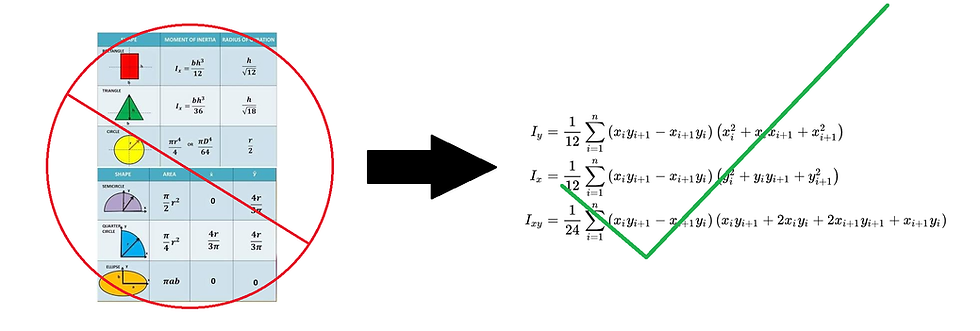
Hand-calculating area moments of inertia for compound cross sections can become tedious very quickly, especially when the geometry is not a simple rectangle, circle, or standard beam section. During my structural mechanics and mechanical design work, I wanted a more general way to compute section properties without repeatedly decomposing shapes and applying the parallel-axis theorem by hand.
To solve this, I created the AMOI Calculator, a MATLAB function that computes the area, centroid, product of inertia, and centroidal area moments of inertia for ARBITRARY 2D polygonal cross sections. The calculator is based on the shoelace method ¹, also known as the polygon area formula. By defining the boundary of a shape using ordered vertices, the function evaluates the geometric properties directly from the coordinates of the polygon. This makes it useful for custom cross sections such as T-beams, brackets, plates, and other nonstandard geometries.
How to use the Area Moment of Inertia Function
Step 1: Define the Vertices
Instead of manually breaking the T-beam into multiple rectangles and using the parallel-axis theorem, the AMOI Calculator allows the section to be represented by its boundary vertices.
For the T-beam example, each black dot on the diagram represents a vertex of the polygonal cross section. The user defines these points in order around the perimeter of the shape. The order matters because the shoelace method depends on the sequence of adjacent coordinate pairs.

Step 2: Make Sure the Function Is Accessible in MATLAB
Before calling the AMOI function, make sure that the function file is located in the same MATLAB directory as the script being executed. This allows MATLAB to recognize and call the function properly.
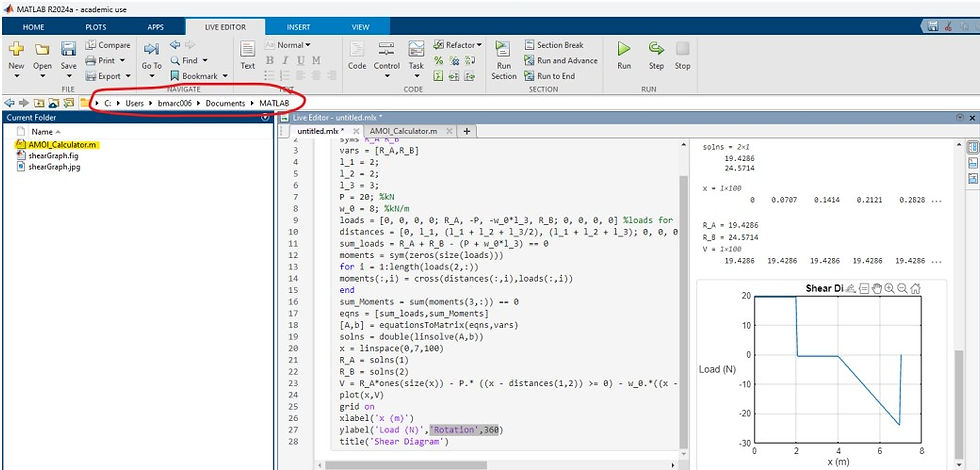

Alternatively, the function can be copied directly into the bottom of the main MATLAB script. This avoids file-directory issues entirely and keeps the section-property calculation contained in one script.
Step 3: Enter the Vertices in Order
The vertices should be written as matching (x)- and (y)-coordinate arrays:

The first and last points should close the polygon. It is important not to mix up the order of the (x_i) and (y_i) terms. Each (x_i) coordinate must correspond to the correct (y_i) coordinate, and the points must follow the boundary of the shape in order. If the vertices are entered out of order, the computed area, centroid, and moment of inertia values will be incorrect.
Once the vertices are defined, the function returns the required section properties:

The results yield:
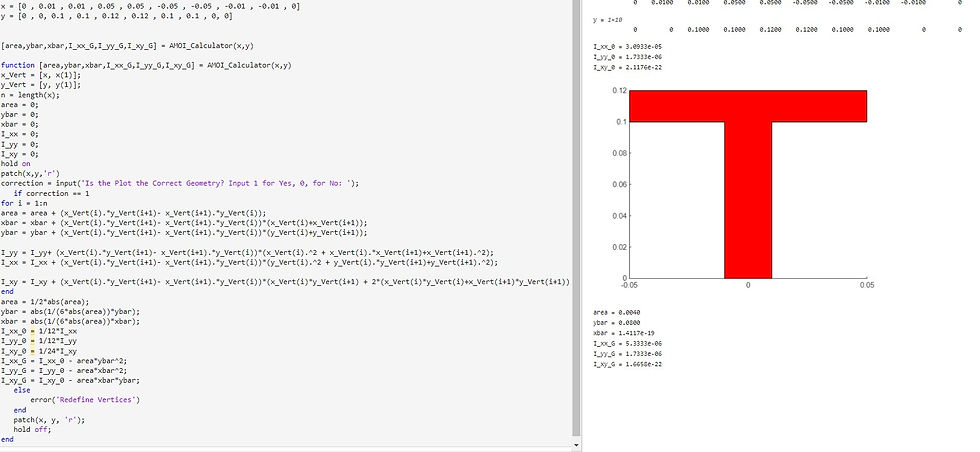
These values can then be used in structural mechanics calculations such as bending stress, transverse shear stress, deflection, and stiffness analysis.
Why This Matters
The purpose of this tool is not just to avoid hand calculations. It reflects a broader engineering idea: geometry can be treated computationally. Instead of relying only on lookup tables or standard shapes, custom mechanical components can be analyzed directly from their vertex data. This becomes especially useful in robotics and mechanical design, where custom brackets, links, plates, and support structures often do not match ideal textbook geometries. The AMOI Calculator helps connect geometry to structural performance, making it easier to evaluate whether a design has enough stiffness and strength for the loads it will experience. The code for the AMOI Calculator is shown below.
Reference
[1] “Second moment of area — Any polygon,” Wikipedia. The polygon second-moment formulas are described as segment-summation formulas related to the shoelace formula and Green’s theorem. https://en.wikipedia.org/wiki/Second_moment_of_area#Any_polygon